Network drives, on a live line.
Shareline draws every file share as a line from your Mac to its server, with its latency over the last few minutes. When a line drops — sleep, a Wi-Fi hop, a server restart — it notices, logs it once, and reconnects the moment the server answers.
Pay once · macOS 14+ · Apple silicon & Intel · ~4 MB download · Already bought? Download Shareline
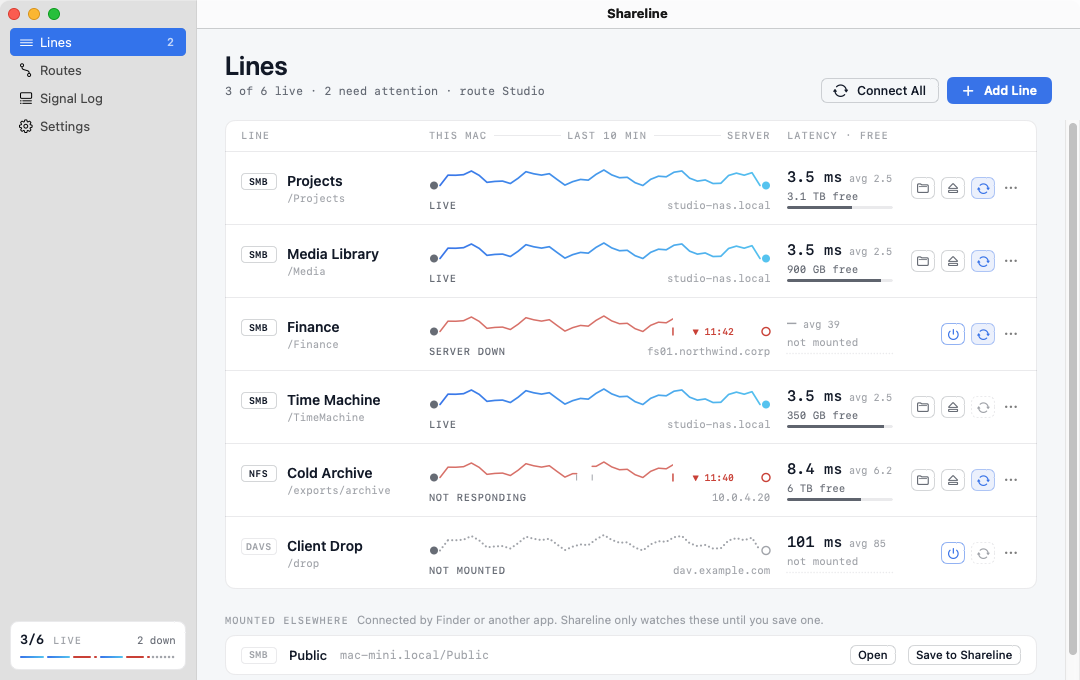
A working model, not a video — sample data. The servers are imaginary and nothing is mounted. Time runs fast here: one check a second, where the app checks every 15 seconds by default. Click the line icon in the model’s menu bar for the popover.
- Pay once, no subscription
- No account
- Talks only to your own servers
- Native on Apple silicon & Intel
- 14-day refund
One glance tells you which drives are healthy.
Every share is a line: solid when it’s live, dashed while it reconnects, broken when the server stops answering, dotted when it isn’t mounted.
Lines, not icons
Each share shows its latency trace, free space and state, with buttons to open, eject or connect it. A share that stops answering is flagged before Finder spins, and ejected by force if you ask.
Reconnects by itself
Lines set to “Keep connected” come back after sleep, a network change or a server restart. Retries start at 5 seconds and back off, so a dead server is never hammered.
Routes
Group lines for Studio, Home or VPN. Switching a route connects its lines and, if you like, ejects the ones that don’t belong — from the menu bar in one click.
The Signal Log
Every drop, recovery and change on a timeline, filterable by kind and kept for 30 days by default. Notifications announce a drop once and a recovery once — no storms.
Paste any address
smb://, afp://, nfs://, WebDAV URLs, \\server\share, IPv6 and ports: the address bar splits what you paste into labelled parts as you type, and says what’s missing.
Finds servers nearby
The add sheet lists file servers announcing themselves on your local network, so you pick a station instead of remembering its host name.
Lives in the menu bar
The popover shows every line, the route switch, Add and Connect All. The full window holds Lines, Routes, the Signal Log and Settings.
Keychain passwords
Passwords are stored as Internet passwords in your login keychain, the same place Finder keeps them. Or have Shareline ask every time and keep nothing.
Respects Finder
Volumes you mounted elsewhere are listed and watched, never ejected, until you save one. Eject a line yourself and it stays off until you connect it again.
Comparing network-drive tools? Read the guide to the best ones for Mac.
Patient when the server’s gone, quick when it’s back.
Each line follows a small set of rules, so it never hammers a dead server and never waits longer than it needs to.
- WatchA quick TCP handshake to each server, every 15 seconds by default. Nothing is sent; the connection closes at once.
3.5 ms - NoticeTwo missed checks in a row and the server is marked down. A drop is logged once and announced once.
server down - Back offRetries start after 5 seconds and double each time, up to a ceiling you set. A wrong password stops retries instead of locking your account.
retry in 40s - ReconnectThe moment the server answers again, or after wake or a network change, the line connects straight away.
back online
Every screen, light and dark.
Screenshots straight from Shareline, with sample shares. Flip between light and dark.


What stays. What connects.
Shareline connects only to your own servers. Nothing about them goes to us.
Stays on your Mac
Your shares, and everything Shareline sees of them.
- ✓Your list of lines and routesIn
~/Library/Application Support/Shareline - ✓The Signal LogKept 30 days by default, on this Mac
- ✓Share passwordsIn your login keychain, or nowhere if you’re asked every time
- ✓How you use itNo analytics or tracking in the app
Connects
Your own servers, plus two small requests.
- 1Your file serversTo mount shares (SMB, AFP, NFS, WebDAV) and check they’re reachable
- 2License checkYour key and an activation ID, to Dodo Payments
- 3Update checkApp name and version, to
shareline.newmac.app
The full list, for every app, is in the privacy policy.
Pay once. Keep it.
One payment, no subscription. Choose how many Macs you’ll use Shareline on.
3 Macs
For your home and work Macs
Checkout opens soon. The buttons above go live here the moment it does.
Every plan includes
- One payment, no subscriptionEvery feature, yours to keep.
- License key by emailSent the moment you pay. Activate in one click.
- Move between MacsUse “Deactivate this Mac”, then activate on the new one.
- Free updatesNew versions install themselves.
- 14-day refundNot for you? Read the refund policy.
- macOS 14 or laterNative on Apple silicon & Intel.
Already bought? Download Shareline · .zip · Install help
Questions, answered.
Which kinds of shares does it support?
SMB (Windows, most NAS boxes and other Macs), AFP, NFS and WebDAV over HTTP or HTTPS — the protocols macOS itself can mount. Shareline uses Apple’s own mounting framework, so a share that works in Finder’s “Connect to Server” works here.
Where are my passwords stored?
In your login keychain as Internet passwords for the server and user name, the same format Finder uses. Shareline never writes them anywhere else. Turn on “Ask for the password every time” to keep nothing at all. A password typed into an address is never saved with the line.
Why does macOS ask about the local network?
Checking whether a server is reachable and listing servers on your network both talk to devices on your local network, which macOS asks you to allow once. Shareline only opens a connection and closes it; it doesn’t read or send data during checks.
Will it eject drives I mounted in Finder?
No. Volumes you didn’t save in Shareline appear under “Mounted elsewhere” and are only watched. Routes only ever eject saved lines, and only when you turn on “Eject lines not on this route”.
Can it pick a route based on my Wi-Fi network?
Not at the moment. Reading the Wi-Fi network name requires location access, so routes are switched from the menu bar instead.
macOS says it can’t verify the developer.
Shareline is distributed directly from this website. Here’s how to open it the first time.
Is there a free trial?
No. Use the working model at the top of this page, or watch the demo video, to see exactly how Shareline works. If it turns out not to be for you, you can ask for a refund within 14 days — see the refund policy.
Can I use Shareline on more than one Mac?
Yes. The 3-Mac and 5-Mac plans cover several Macs with one license key. Any license can move to a new Mac: choose “Deactivate this Mac” in Shareline on the old one, then activate on the new one.

Stop reconnecting by hand.
Add your shares once. Shareline keeps the lines up and tells you when one drops.